Showing posts with label MAXON CINEMA 4D. Show all posts

Tuesday, March 3, 2026

MAXON CINEMA 4D 2026: A Tutorial Approach

MAXON CINEMA 4D 2026: A Tutorial Approach is a tutorial-based textbook and it aims at harnessing the power of MAXON CINEMA 4D 2026 for modelers, animators, and designers. The textbook caters to the needs of both the novice and the advance users of MAXON CINEMA 4D 2026. Keeping in view the varied requirements of users, the textbook first introduces the basic features of CINEMA 4D 2026 and then progresses to cover the advanced techniques. In this edition, the Redshift renderer is used throughout to create materials, set up lighting, and produce final renders in Cinema 4D 2026. Additionally, three projects based on the tools and concepts covered in the book have been added to enhance the knowledge of users.


Topics covered in the book
  • Modeling
  • Texturing
  • Sculpting
  • Volume Builder
  • Lighting
  • Rigging
  • Animation
  • Body Paint 3D
  • Compositing
  • Rendering
  • MoGraph
  • XPresso
  • Asset Browser 

Salient Features
  • Consists of 13 chapters and 3 projects that are organized in a pedagogical sequence covering various aspects of modeling, sculpting texturing, lighting, rendering, and animation. 
  • Tutorial approach to explain the concepts of modeling, texturing, lighting, and animation.
  • First page of every chapter summarizes the topics that are covered in it.
  • Step-by-step instructions that guide the users through the learning process.
  • Additional information is provided throughout the book in the form of notes and tips.
  • Self-Evaluation Test, Review Questions, and Exercises are given at the end of each chapter so that the users can assess their knowledge.
MAXON CINEMA 4D 2026: A Tutorial Approach book is available for purchase on the following platforms:
MAXON CINEMA 4D 2026: A Tutorial Approach, 11th Edition

MAXON CINEMA 4D 2026


Friday, September 16, 2022

MAXON CINEMA 4D S24: A Tutorial Approach, 8th Edition

MAXON CINEMA 4D S24: A Tutorial Approach is a tutorial-based book and aims at harnessing the power of MAXON CINEMA 4D S24 for modelers, animators, and designers. The book caters to the needs of both the novice and the advance users of MAXON CINEMA 4D S24. Keeping in view the varied requirements of users, the book first introduces the basic features of CINEMA 4D S24 and then progresses to cover the advanced techniques.


Salient Features

  •  Consists of 13 Chapters and 3 Projects that are organized in a pedagogical sequence covering various aspects of modeling, sculpting texturing, lighting, rendering, and animation.
  • The author has followed the tutorial approach to explain various concepts of modeling, texturing, lighting, and animation.
  • The first page of every chapter summarizes the topics that are covered in it.
  • Step-by-step instructions that guide the users through the learning process.
  • Additional information is provided throughout the book in the form of notes and tips.
  • Self-Evaluation Test, Review Questions, and Exercises are given at the end of each chapter so that the users can assess their knowledge.

Table of Contents
Chapter 1: Exploring CINEMA 4D S24 Interface
Chapter 2: Working with Splines
Chapter 3: Introduction to Polygon Modeling
Chapter 4: Sculpting
Chapter 5: Texturing
Chapter 6: Lighting
Chapter 7: Rigging
Chapter 8: Animation
Chapter 9: Introduction to UV Mapping
Chapter 10: Compositing 3D objects
Chapter 11: Rendering
Chapter 12: MoGraph
Chapter 13: Working with XPresso
Project 1: Creating an Indoor Scene
Project 2: Texturing an Indoor Scene
Project 3: Creating an Exterior Scene
Index

MAXON CINEMA 4D S24: A Tutorial Approach, 8th Edition book from

SOLIDWORKS 2023 for Designers, 21st Edition
SOLIDWORKS 2023 Book by Prof. Sham Tickoo

For more information visit: https://www.cadcim.com/
Follow us@twitter https://twitter.com/cadcimtech
Like our page: https://www.facebook.com/cadcim/


Thursday, January 27, 2022

Cinema 4D S24 Place Tool Features

This is an interactive tool used for placing objects on polygonal surfaces. When you choose this tool, two handles will be displayed; the cube-shaped handle is used to scale the object and the hemisphere-shaped handle is used to rotate the object. To place an object on the surface of any other polygonal object, you need to click on the surface of the object so that the cube-shaped handle and hemisphere-shaped handle are not selected. Next, drag the object to the desired place. When you press the CTRL key along with this tool, you can create copies of the objects to be placed. When you press and hold the left mouse button on the Place tool, a flyout will be displayed. In this flyout, the Scatter Pen and the Dynamic Place tools are available.


MAXON Cinema 4D S24 Place Tool Features

Tuesday, January 25, 2022

Complete Modeling Guide: Cinema 4D S24

Complete Modeling Guide: Cinema 4D S24 Udemy Course Trailer

Course Information:

This video course aims at harnessing the power of MAXON CINEMA 4D S24 for modelers, and designers. The video course caters to the needs of both the novice and the advance users of MAXON CINEMA 4D S24. Keeping in view the varied requirements of users, the course first introduces the basic features of CINEMA 4D S24 modeling and then progresses to cover the advanced techniques. Also, one project is based on the tools and concepts covered in the video series have been added to enhance the knowledge of users.
This course is basically designed to assist 3D modelers. Keeping in view the varied requirements of the students, this course covers a wide range of tools and features such as various selection, placement, polygon modeling, Spline modeling, Sculpting, Volume modeling and so on. On the completion of this course, students will be able to model the complex objects and thereby model interior and exterior scenes with much ease.

Salient Features of this Course:

  • A comprehensive course consisting of 53 video lectures that are organized in a pedagogical sequence.
  • Detailed explanation of all Cinema 4D modeling commands and tools.
  • Step-by-step instructions to guide the users through the learning process.
  • One project at the end of the course to enable the users to apply the skills learned in the course
  • Practice Test
  • Certificate of Completion

Video Course Available on Udemy

Complete Modeling Guide: Cinema 4D S2

CADCIM Technologies Releases MAXON CINEMA 4D S24: A Tutorial Approach, 8th Edition Book by Prof. Sham Tickoo (Purdue University, USA)

Book available on CADCIM Website.

To buy Paperback, click - 'https://bit.ly/31G8ndH'
To buy eBook, click 'https://amzn.to/304lg07'


Friday, August 9, 2019

How to Create a Ring Using Volume Builder

To create a model in cinema 4D you’re constantly switching among the drawing tools, views and components. In this article, you find several examples that illustrate ways you can use these tools together to model a specific shape or object.
  • Choose Create > Object> Torus from the menu bar and create a torus with a radius of about 394 cm and enough Pipe segments and Ring Segments for smoothness, refer to Figure 1.

Object-1
Figure:1
  • Choose Create > Object> Sphere from the menu bar and create a sphere with a radius of about 46 cm and enough segments.
  • Scale sphere vertically and align with torus as shown in Figure 2.

    Figure:2
  • Create one more sphere with radius of about 18 cm, scale and align it with first sphere, refer to Figure 3.

    Figure:3
  •  Create another torus with radius of 450cm & align it with the first torus, as shown in Figure 4.

    Figure:4
  • Create one more sphere of radius 10cm.
  • Next, choose MoGraph > Cloner from menu bar
  • In the Object Manager, select the last sphere created (radius =10) and drag it to Cloner, as shown Figure 5.

    Figure:5
  • Select Cloner in the Object Manager and set the parameters in the Attribute Manager, as shown in Figure 6.

    Figure:6
  • You will notice that cloned spheres are arranged radially around torus as shown in Figure 7.

    Figure:7
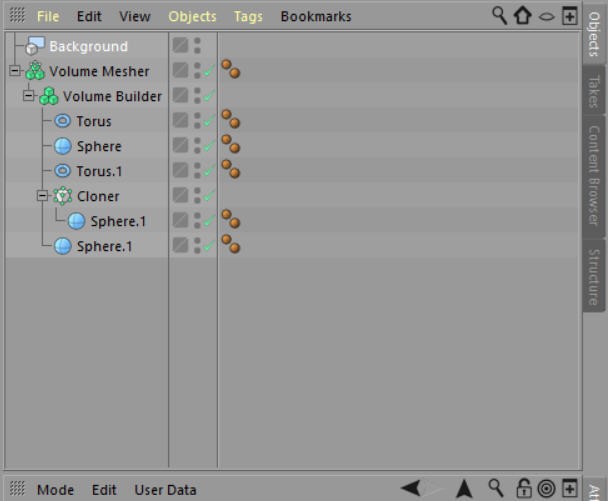
  • Choose Volume > Volume Builder from menu bar
  • Now, drag all the objects one by one to Volume Builder in the Object Manager, as shown in Figure 8.
  • Choose Volume > Volume Mesher from menu bar
  • In the Object Manager, drag Volume Builder to Volume Mesher.

    Figure:8
  • Choose the Render to Picture Viewer tool; rendered view of ring is displayed, as shown in Figure 9.
    Figure:9
     You can use the tips & techniques demonstrated in these ring model example.

    To order MAXON CINEMA 4D R20 Studio: A Tutorial Approach, 7th Edition Book, please visit the following links:-


Thursday, May 30, 2019

MAXON CINEMA 4D R20 Studio: A Tutorial Approach, 7th Edition

MAXON CINEMA 4D R20 Studio: A Tutorial Approach is a tutorial-based book and aims at harnessing the power of MAXON CINEMA 4D R20 Studio software for modelers, animators, and designers. The book caters to the needs of both the novice and the advance users of MAXON CINEMA 4D R20 Studio. Keeping in view the varied requirements of users, the book first introduces the basic features of CINEMA 4D R20 Studio and then progresses to cover the advanced techniques. In this textbook, two projects based on the tools and concepts covered in the book have been added to enhance the knowledge of users.
This textbook will help you unleash your creativity and transform your imagination into reality with ease.
Salient Features

  • Consists of 13 chapters and 2 projects that are organized in a pedagogical sequence covering various aspects of modeling, sculpting texturing, lighting, rendering, and animation.
  • The author has followed the tutorial approach to explain various concepts of modeling, texturing, lighting, and animation.
  • The first page of every chapter summarizes the topics that are covered in it. Step-by-step instructions that guide the users through the learning process.
  • Additional information is provided throughout the book in the form of notes and tips. Self-Evaluation Test and Review Questions are given at the end of each chapter so that the users can assess their knowledge.
Table of Contents

Chapter 1: Exploring CINEMA 4D R20 Studio Interface
Chapter 2: Working with Splines
Chapter 3: Introduction to Polygon Modeling
Chapter 4: Sculpting
Chapter 5: Texturing
Chapter 6: Lighting
Chapter 7: Rigging
Chapter 8: Animation
Chapter 9: Introduction to UV Mapping
Chapter 10: Compositing 3D objects
Chapter 11: Rendering
Chapter 12: MoGraph
Chapter 13: Working with XPresso
Project  1: Creating an Indoor Scene
Project  2: Texturing an Indoor Scene

To order this book, please visit the following links:-

Autodesk Maya 2018: A Comprehensive Guide, 10th Edition Textbook:- https://www.cadcim.com/maxon-cinema-4d-r20-studio-a-tutorial-approach

Amazon Kindle Edition: https://www.amazon.com/MAXON-CINEMA-4D-R20-Studio/dp/1640570640/


For more information visit: https://www.cadcim.com/

Follow us@twitter https://twitter.com/cadcimtech

Like our page: https://www.facebook.com/cadcim/